Resprite: pixel art studio
- 4.5
- Rating
- 100.00K
- Installs
- Free
- Price

 Analysis by App-foxy
Resprite: pixel art studio is the kind of art app I would recommend when you want to make small, deliberate images rather than paint freely across a large canvas. I found its appeal in the discipline of pixel work: every mark matters, animation depends on careful frame changes, and a simple-looking sprite can take real concentration. It is focused, approachable, and more useful than its brief store description suggests, although that focus also means it is not a universal drawing solution.
Developed by Fengeon, this free Art & Design app is built around pixel art and sprite animation. That combination makes it relevant to people creating game characters, tiny icons, looping effects, retro illustrations, or visual experiments for social posts. I would not choose it as my main tool for sketching a detailed portrait, editing photographs, or producing a print-ready illustration. Its strengths appear when the image is intentionally small, grid-based, and made from carefully controlled color blocks.
Why this focused pixel workflow works
My first impression was that Resprite encourages a different way of thinking from a conventional painting app. In a typical mobile art program, I expect brushes, soft edges, pressure-like gestures, and a canvas that rewards broad strokes. Here, the useful mindset is closer to building an image one tile at a time. That can feel slower at first, but it also makes mistakes easier to understand. If a face looks wrong, I can inspect the placement of individual pixels instead of wondering whether a brush setting caused the problem.
You May Also Like

 Blood Strike: 2.5 Anniversary
Blood Strike’s Loadouts Turn Every Drop Into a Tactical Gamble
A close look at Blood Strike’s custom loadouts: how fast access to signature weapons reshapes its battle royale rhythm, rewards preparation, and narrows the gap between fights.

 Pandora - Music & Podcasts
Pandora’s Music Is Easy to Start, but Harder to Recover
Pandora’s strength is its low-effort path from a seed to a station. Its weak spot is how much confidence it asks you to place in connection, setup, and quiet recovery.

 8 Ball Pool
8 Ball Pool Is Built on Rivalries, Rematches, and Routine
A close look at the rivalries, rematches, shared routines, and unanswered safety questions that turn a quick pool match into a persistent mobile community.

 Samsung Music
Samsung Music’s Quiet Strength Is Playing What You Already Own
Its reach comes less from spectacle than from dependable access to a personal library. That simplicity is both the app’s strongest retention engine and its ceiling.

 AccuWeather: Weather Radar
AccuWeather Review: A Quick, Clear Forecast for Everyday Decisions
For everyday plans, the best forecast is the one you can understand quickly. AccuWeather makes rain timing, radar, and local conditions easy to act on, with a few trade-offs.

 Hill Climb Racing
Why Hill Climb Racing Still Turns Crashes Into One More Run
A tiny car, a bumpy hill and one more upgrade: Hill Climb Racing keeps resurfacing because its simple chaos makes every near-miss feel personal.
More From Our News Desk



The app’s most important value is the relationship between still artwork and motion. A sprite is not merely a small picture; it often needs to communicate a pose, direction, impact, or repeated action. Working in an editor that treats animation as part of the same creative task is more practical than drawing separate images in a general art app and trying to organize them afterward. I found that especially useful for testing whether a character’s movement actually reads clearly rather than looking attractive only in a single frame.
That frame-by-frame approach also changes how I judge color. In a large illustration, a subtle gradient can hide a weak transition. In pixel art, a single contrasting square may become the focal point. I recommend starting with a limited palette and adding colors only when they solve a visible problem. This is not a rule imposed by the app; it is a workflow choice that suits the medium and prevents a small canvas from becoming noisy.
A practical routine is to block the silhouette first, check it at its intended viewing size, and only then add facial marks, highlights, or clothing details. Enlarging the canvas makes editing easier, but it can mislead you into believing that tiny details will remain visible when the sprite is displayed at normal size. I often zoom out repeatedly while working, because the final result matters more than the enlarged editing view.
Useful for more than game characters
Although game sprites are the obvious use case, I found several other situations where the focused format makes sense. Small animated stickers, looping status symbols, tiny avatars, interface icons, and short visual studies all benefit from precise edges. Someone learning animation can also use a compact sprite as a manageable exercise: change one part of a pose, compare the frames, and learn how timing and spacing affect the illusion of movement.
It can be a convenient companion for a larger creative project too. I might use a tablet or phone to draft a character while commuting, refine a few frames during a break, and later bring the finished concept into a broader game or illustration workflow. That does not make the app a replacement for every desktop tool, but it gives mobile work a clear purpose instead of treating it as a reduced version of a full studio.
One less obvious benefit is that pixel art exposes inconsistency quickly. If a character’s outline changes thickness from one frame to the next, the movement may look jittery. If a highlight jumps by an unexpected amount, the object can appear to flicker. I use this as a quality check: compare neighboring frames for outline continuity before spending time on decorative details. The small scale makes structural problems visible sooner.
Animation work rewards a careful process
For a simple walking or blinking sequence, I would begin with the key poses rather than drawing every frame immediately. Establish the contact, passing, and recovery positions, then fill the transitions. This reduces the risk of creating a collection of attractive drawings that do not form convincing motion. Resprite’s value here is not just that it handles sprites; it keeps the animation task close to the artwork, so I can judge the sequence as a sequence.
Another useful habit is to duplicate the logic of a movement, not necessarily every visual detail. A blinking eye, for example, may need only a few carefully chosen states. A sword swing may communicate better through a strong silhouette and a brief effect than through many nearly identical frames. On a small screen, restraint is often more readable than complexity. The app suits that kind of economical decision-making.
I also recommend naming or organizing a personal workflow outside the drawing itself. Keep a clear distinction between rough frames, revised frames, and final frames if a project grows. Pixel art can look simple enough to invite casual editing, but animation becomes difficult to maintain when every version is treated as interchangeable. The app helps with creation; the artist still needs a sensible method for tracking decisions.
Where the experience becomes less comfortable
The main weakness is the same focus that makes the app appealing. Pixel editing demands precision, and precision on a phone can become tiring. Fingers cover the area being edited, accidental taps are easy to make, and long sessions may feel cramped compared with a desktop editor and a large monitor. A stylus or larger tablet can improve control, but the experience still depends on the limitations of a mobile screen.
There is also a learning curve for people who arrive from ordinary drawing apps. The image may look rough while it is being built, and a beginner can mistake intentional hard edges for unfinished work. Animation adds another layer of decisions: a frame can be technically correct yet still feel too fast, too slow, or visually unbalanced. I would give new users time to understand the pixel-art mindset before judging the app by their first result.
Another trade-off is that a specialized editor may not cover the entire production path someone has in mind. If I need advanced photo manipulation, natural-media brushes, typography, broad vector shapes, or a polished print layout, I would choose a different tool. Resprite makes sense as a dedicated pixel workspace, not as a single replacement for every creative application on a phone.
In-app purchases range from $1.49 to $23.99 per item, so it is worth considering how deeply you plan to use the app before paying for anything. The free starting point makes experimentation easy, but a serious user should think about whether the available workflow matches a long-term project. I would first create a few still sprites and a short animation, then decide whether the app earns a permanent place in my toolkit.
What beginners should know before starting
The app is free to install, carries an Everyone age rating, and requires Android 7.0 or later. That makes it accessible to a broad range of Android users, though compatibility alone does not guarantee a comfortable drawing experience. Screen size, touch accuracy, and whether you have a stylus will matter more than the minimum operating-system requirement once you begin detailed work.
Its current version is 1.32.0, and the app has attracted over one hundred thousand installs. It holds a 4.5 average from around two thousand ratings, with 112 written reviews. Those figures suggest that the concept has found a real audience, but I would still treat popularity as a starting signal rather than proof that it will suit every artist. Pixel work is personal, and the best test is whether the editing rhythm feels manageable in your own hands.
For an everyday scenario, imagine that I want to make a tiny animated campfire for a personal game prototype. I would sketch the flame as a compact silhouette, create a few variations in its height and shape, and check the sequence at normal size. Then I would adjust the brightest pixels so the fire appears to flicker rather than simply jump. This is exactly the sort of contained task where a specialized sprite editor feels more sensible than opening a full illustration suite.
For a social-media icon, I would take a different approach. I would avoid over-detailing the image, test it at the small size where people will actually see it, and keep the outline strong enough to survive a busy background. A general drawing app might offer more artistic freedom, but Resprite’s pixel constraints help me make decisions quickly. The limitation becomes useful when the goal is clarity.
Who should choose it, and who should skip it
I think Resprite is a strong fit for beginners who specifically want to learn pixel art, hobbyist game developers making small assets, and artists who enjoy frame-by-frame experimentation. It is also suitable for someone who wants a focused mobile tool instead of a crowded app with dozens of unrelated brushes and panels. If your projects involve compact graphics and short animations, the specialization can save mental effort.
I would be more cautious recommending it to a painter who wants expressive brush texture, a designer working mainly with scalable vector artwork, or a professional whose workflow depends on broad desktop-style production tools. The app may still be useful for a small part of those workflows, but it should not be mistaken for the best choice for every kind of visual work.
Compared with a general mobile drawing app, Resprite offers a clearer reason to exist: it puts pixel construction and sprite motion at the center. Compared with a desktop pixel-art package, its likely advantage is convenience and immediacy, while the phone or tablet form factor is the compromise. I would choose it when I value portability and a direct workflow more than a large workspace, extensive production management, or the comfort of a keyboard and mouse.
My strongest recommendation is to judge it through a small finished project rather than a long tutorial session. Make one static icon, one character pose, and one short loop. If the process of correcting individual pixels feels satisfying, you have probably found the right kind of tool. If every adjustment feels cramped or tedious, a larger-screen alternative will serve you better, regardless of how appealing the feature list sounds.
My final view after using the studio
Resprite: pixel art studio is best understood as a focused craft tool, not an all-purpose art studio. I like it because it respects the specific demands of pixel images and animation instead of hiding them behind a generic painting interface. The strongest results come from patience, limited palettes, repeated checks at real size, and a willingness to edit frames one small decision at a time.
Its limitations are real: mobile precision can be tiring, animation takes practice, and artists working outside pixel-based projects will quickly meet the boundaries of its purpose. Still, those boundaries are also what give the app character. Fengeon has made something that can turn a phone or tablet into a practical place for compact sprite work, especially when I want to create, test, and revise an idea without opening a much larger production environment.
Because it is free to begin and aimed at Everyone, I would recommend trying it to anyone curious about pixel art or basic sprite animation. I would not promise that it replaces a desktop setup, and I would not choose it for painterly illustration. But for a learner building their first animated character, a hobbyist preparing small game assets, or an artist who enjoys the precision of tiny images, it is a convincing and purposeful choice.
FAQs for Resprite: pixel art studio
01What is Resprite: Pixel Art Studio used for?
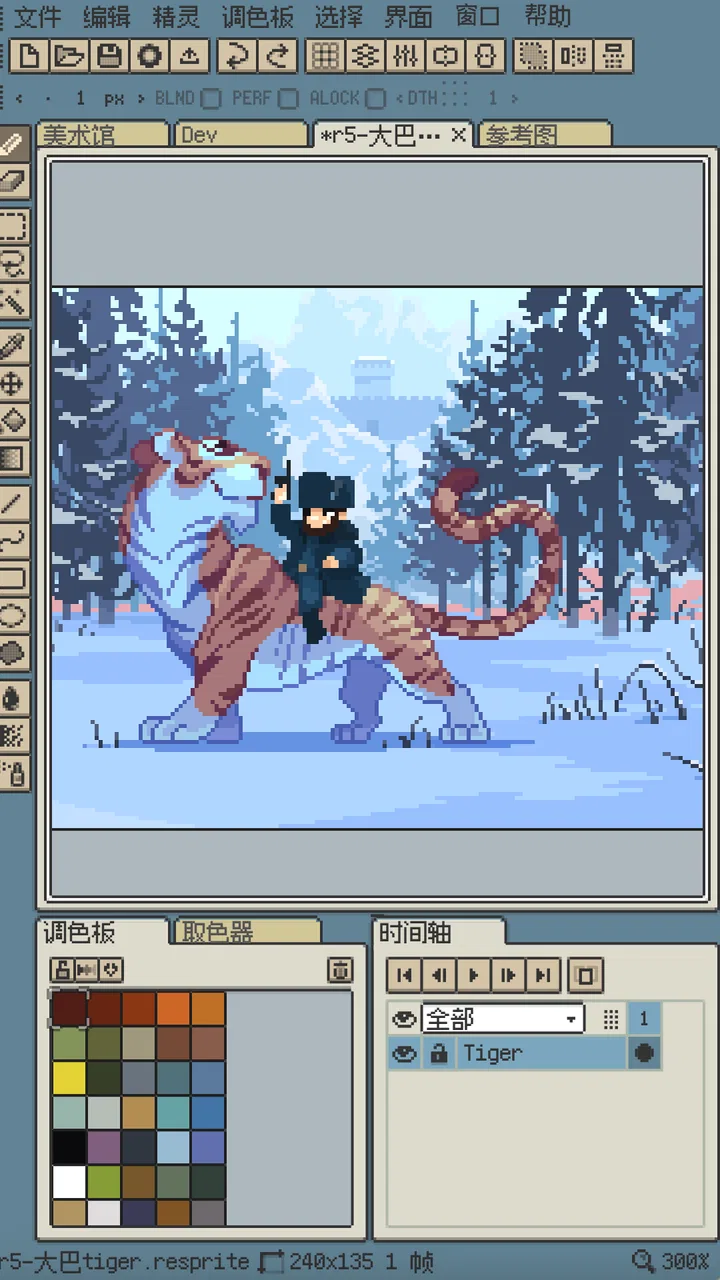
Resprite is a mobile pixel-art editor designed for creating, editing, and animating retro-style artwork. It provides tools for drawing individual pixels, working with layers, selecting colors, importing images, and building frame-by-frame animations. It can be useful for game assets, sprites, icons, tiles, avatars, and personal illustrations, whether you are a beginner experimenting with pixel art or an experienced artist who wants a portable editor.
02Is Resprite suitable for beginners, or is it mainly for experienced pixel artists?
Resprite can work well for both beginners and experienced creators, although new users may need a little time to understand the interface and pixel-art workflow. The basic drawing tools are approachable, while features such as layers, palettes, selections, and animation offer more control as your skills improve. Beginners should start with a small canvas and simple shapes before moving on to detailed sprites or animated projects.
03Can I create animations and game sprites with Resprite?
Yes, Resprite is designed to support pixel-art animation as well as static images. You can create separate frames and preview movement, making it useful for characters, enemies, effects, objects, and other game assets. The app is especially convenient for short looping animations and sprite work. However, users working on large, complex productions may still prefer desktop software for advanced timeline management and extensive asset organization.
04What file formats does Resprite support for importing and exporting artwork?
Resprite includes options for working with common image formats and exporting finished artwork for use in games, social media, or other creative projects. PNG is particularly useful for pixel art because it preserves sharp edges and transparency. Depending on the platform version and project settings, available import and export choices may differ, so it is worth checking the current app listing or export menu before starting an important project.
05Does Resprite require an internet connection, and are there any limitations to consider?
Resprite is primarily a creative drawing application, so many of its core editing functions can generally be used without a constant internet connection. Availability of certain features, purchases, advertisements, cloud-related functions, or platform-specific tools may vary between Android and iOS versions. Before downloading, users should review the current store description, device requirements, pricing model, and permission requests to confirm that the app matches their needs.
Pros
- Powerful pixel-level editing tools for precise artwork.
- Supports layers
- animation frames
- and custom color palettes.
- Useful onion-skinning features simplify frame-by-frame animation.
- Exports artwork in common formats for sharing or further editing.
- Works well for creating sprites
- tilesets
- and retro game assets.
Cons
- The interface can feel crowded on smaller phone screens.
- Advanced tools may take time for beginners to learn.
- Some features may require an in-app purchase or subscription.
- Large animated projects can consume considerable device storage.
- Touch controls may feel less precise than using a stylus or mouse.

Resprite: pixel art studio
Gallery